CompTIA A+ Training Course in the Philippines
Build practical IT support skills in computer hardware, laptops, Windows operating systems, networking, printers, mobile devices, security, and troubleshooting.
CNCTC’s CompTIA A+ course is designed for beginners, fresh IT graduates, career shifters, office staff, and aspiring technical support professionals who want hands-on IT training.
5 Days
Instructor-led practical training
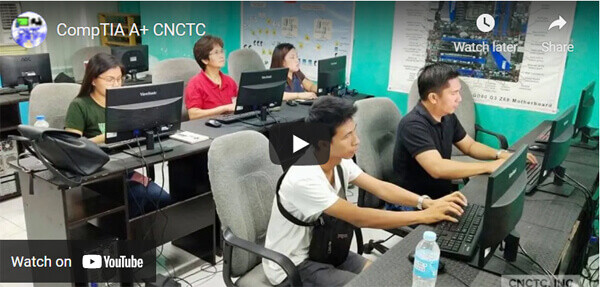
Hands-On Labs
PC repair, OS, networking, and troubleshooting
Expert Trainer
Learn from experienced CompTIA A+ instructors
Test Center
In-house CompTIA A+ testing facility
About the CompTIA A+ Course
This CompTIA A+ training course covers the essential skills needed to understand computer technology, PC hardware, operating systems, networking, security, mobile devices, printers, and troubleshooting.
Students will learn how to identify, install, configure, upgrade, maintain, and troubleshoot PC workstations, laptops, Windows operating systems, computer peripherals, and SOHO networks.
The course is ideal for learners who want to repair computers, support end users, set up basic networks, and prepare for CompTIA A+ Core 1 and Core 2 certification exams.
Best For
Fresh IT Graduates Career Shifters Technical Support Staff Helpdesk Beginners Office Staff IT EnthusiastsTraining Options
Choose the learning setup that fits your schedule and preferred training style.
Face-to-Face Training
- 5 days instructor-led classroom training
- TESDA registered training center
- Weekday and weekend schedules
- Hands-on computer hardware activities
- CompTIA A+ certified expert instructor
Live Online Training
- 5 days live instructor-led virtual class
- Remote lab PC access
- Integrated courseware
- Unlimited practice exams
- E-learning support before and after training
1-on-1 Training
- Personalized training experience
- Focused attention from your trainer
- Ideal for faster learning
- Hands-on laboratory activities
- Guaranteed training start
What You’ll Learn
Practical IT support skills for hardware, software, networking, and security.
Computer Hardware
- Identify PC and laptop components
- Assemble and disassemble computers
- Understand RAM, CPU, motherboard, storage, and peripherals
- Configure connectors and add-on cards
Operating Systems
- Install and upgrade Windows OS
- Install drivers and software
- Troubleshoot Windows errors
- Use Windows tools and utilities
Networking
- Understand basic networking concepts
- Identify network hardware and software
- Set up wired and wireless SOHO networks
- Troubleshoot network connectivity issues
Security
- Detect and remove malware
- Apply basic security practices
- Secure workstations and mobile devices
- Understand threats and vulnerabilities
Printers and Devices
- Maintain printer operability
- Troubleshoot printer issues
- Support mobile devices and peripherals
- Understand hardware compatibility
Troubleshooting
- Apply troubleshooting methodology
- Perform backup and recovery basics
- Use remote access tools
- Handle real-world IT support scenarios
Who Should Attend?
This course is ideal for individuals who want to become technical support staff, helpdesk technicians, field support technicians, or entry-level IT support professionals.
It is recommended for fresh IT graduates, career shifters, office staff, IT enthusiasts, and beginners who want a strong foundation in computer support.
Prerequisites
Students should be familiar with basic computer usage and the Windows operating system. No advanced IT background is required.
Career Opportunities After Training
After completing the course, students can pursue entry-level IT support roles and build a strong foundation for advanced certifications. Support roles include the following;
CompTIA A+ Certification Exams
The CompTIA A+ certification is composed of two exams. Students preparing for certification should be ready for both Core 1 and Core 2 objectives.
220-1101: Core 1
Covers mobile devices, networking, hardware, virtualization, cloud computing, and hardware/network troubleshooting.
220-1102: Core 2
Covers operating systems, security, software troubleshooting, and operational procedures.
Course Outline
Key topics covered in the CompTIA A+ training course.
Mobile Devices and Hardware
- Laptop hardware components and displays
- Mobile device features, add-ons, and ports
- PC components, cables, connectors, RAM, CPU, and storage
- Motherboards, power supplies, peripherals, and printers
Networking and Troubleshooting
- IPv4, TCP/UDP ports, and network services
- Wired and wireless SOHO network setup
- Wireless networking protocols and internet connection types
- Hardware, mobile, printer, and network troubleshooting
Cloud and Virtualization
- Cloud computing fundamentals
- Client-side virtualization setup and configuration
Storage and Printers
- Storage formatting and configuration
- RAID basics
- Multifunction printer setup and maintenance
Operating Systems
- Windows versions, installation, and upgrades
- Windows tools, Control Panel utilities, and command-line tools
- Application software installation and configuration
- Mac OS and Linux desktop operating system basics
Security
- Physical and logical security concepts
- Wireless security and authentication methods
- Malware detection, prevention, and removal
- SOHO wired and wireless network security
Software Troubleshooting
- Windows troubleshooting
- Security issue resolution
- Mobile OS and application troubleshooting
- Malware removal best practices
Operational Procedures
- Documentation and change management
- Disaster prevention and recovery
- Safety and environmental controls
- Professional communication and remote access basics
Course Fee and Schedule
Duration: 5 days / 9:00 AM – 3:00 PM / 30 hours
Loading schedules…
CompTIA A+ Training FAQ
Recommended Next Course
After CompTIA A+, the next recommended certification path is networking.
View CompTIA Network+ BootcampGet Started with CompTIA A+ Training
Request a quotation or contact CNCTC for course schedules and pricing.
Call Us for More Information
Tel: (+632) 8285-2936 / (+632) 8736-2032
SMART: 09603525899 / 09603525900
GLOBE: 09665816139
Request a Quotation


